The Critical Path Method
Scheduling Methods
Bar Chart (Gannt Chart)
A Bar Chart represents the sequence and duration of activities in a project.
Each bar represents one activity, with the length of the bar indicating the activity’s duration and the position of the bar indicating the time period when the activity is projected to take place.
The Bar Chart has two variables:
-
1) Time
-
2) Scope
The Critical Path Method (CPM)
The critical path method (CPM) refines the Bar Chart representation of a project by adding relationship ties between activities so that if anything changes, its effects on the rest of the schedule can immediately be seen.
The “critical path” is simply the chain of activities from the start to the finish of a project that has the least amount of float (takes the most time to complete), such that any delays in the critical path activities will negatively impact the finish date of the project. The usefulness of the CPM is that it allows you to run “what if” scenarios and spot potential problem areas early, while there is still time to proactively deal with them. It also provides an effective way of documenting the impact of delays on a project.
The CPM method has Three Variables:
-
1) Time
-
2) Scope
-
3) Logic
In an Activity Diagram, a network of tasks can be set up to show the dependent sequence of activities within a project. The Critical Path Method can be applied to such as network to answer the most common question asked of project managers: How long will the overall project take?
Critical Path can be determined by :
-
manual calculation
-
using a spreadsheet
-
using CPM software such as Primavera P6, Microsoft Project, Asta Power Project or similar
We will explain the manual method, using the instructions described below.
A very common next step is to add timings to show how long each task will take and then to identify the critical path, which is the route through the network that will take the longest amount of time.
Tasks that are not on the critical path have more leeway (float) and may be slipped (delayed) without affecting the end date of the project. This is called float (slack).
Tasks on the critical path have no float and this feature may be used to identify the critical path. It is also quite common to have more than one critical path, a near-critical path, or a parallel path.
A simple bar chart is shown here:
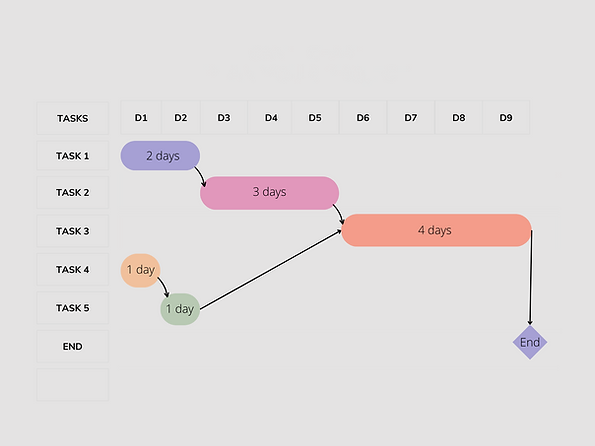
How do you do we calculate the Critical Path?
Build a simple Activity Diagram, including estimating the time required (or duration) for all tasks. Based on the simple bar chart above :

Next, we need to Include a space on each task ‘card’ for early and late start and finish dates or times (times, rather than dates, are required for tasks where hours or minutes are significant).

The early start and early finish are simply the earliest times that a task can start or finish. The late start and late finish are the latest times that a task can start or finish.
For this example, we will assume that each calendar day is available for work. Start date 13 MAR 2025 (13MAR). We also assume that the work day commences at 8am and finishes at 4pm.
Starting with the tasks at the beginning of the diagram, complete the early start and early finish for each task in turn, following the arrows to the next task, as in the figure below.
The early start of a task is the same as the early finish of the preceding task. If there is more than one predecessor task, then there are several possible early start figures. Select the latest of these.
The early finish for each task is equal to the early start plus the duration of the task. The final calculation is for the earliest completion time for the project. This is calculated in the same way as the early start date.

Starting with the tasks at the end of the diagram, calculate the late start and late finish for each task in turn, following the arrows in the reverse direction to the previous task, as in the diagram below.
The late finish is the same as the late start of the succeeding task (for the final tasks in the project, this is equal to the earliest completion date). If there is more than one successor task, then there are several possible late figures. Select the earliest of these.
The late start for each task is the late finish minus the duration of the task.

You now have, for each task, the earliest and latest times that it can start and finish.
Now find the slack time (or ‘float’) for each task by subtracting the early start from the late start. The slack time is the amount of time the task can be slipped by without affecting the end date of the process.
The critical path can now be identified as all paths through the network where the slack time is zero.

It may be possible to reduce the critical path of a project (and consequently pull in the completion date) by rearranging some tasks that have an optional sequence or by moving key people onto tasks in the critical path so you can reduce the time for these tasks.
The above ‘Project’ was a simple 5 Task schedule, with relatively simple logic (Finish – Start). Complex projects with numerous activities and complicated logic requires CPM software to undertake the above forward pass and backward pass calculations, quickly and accurately.
It is important, as a planner, to understand the fundamentals of CPM, before jumping into CPM software. Not all CPM software is the same.
It may be possible to reduce the critical path of a project (and consequently pull in the completion date) by rearranging some tasks that have an optional sequence or by moving key people onto tasks in the critical path so you can reduce the time for these tasks.
The above ‘Project’ was a simple 5 Task schedule, with relatively simple logic (Finish – Start). Complex projects with numerous activities and complicated logic requires CPM software to undertake the above forward pass and backward pass calculations, quickly and accurately.
It is important, as a planner, to understand the fundamentals of CPM, before jumping into CPM software. Not all CPM software is the same.
CPM software intro
As of March 2024:
-
Primavera P6
-
Asta Power Project
-
Microsoft Project
-
others
P6 Vs MS Project Vs Asta


The three primary scheduling and control software packages used in the building, construction, and resources industries are Microsoft Project, Oracle Primavera P6, and Asta Powerproject (Elecosoft). Each of these software packages has distinct origins, architectures, and industry applications, offering various advantages and facing certain disadvantages within their operational contexts.
Origins
Microsoft Project was developed in the US in 1984, initially aimed at managing software development projects. Its functionality has evolved over time, with significant features like Cost Resources and Calendar Exceptions being added.
Oracle Primavera P6 originated as Eagle Ray in the 1990s, later acquired by Primavera Systems. It was designed for software and business development projects and has since become a staple in more extensive project management applications.
Asta Powerproject was developed in the early 1980s in the UK, with a strong focus on the building and construction industries. It incorporates features specifically tailored to these sectors.
Architecture
Microsoft Project offers three versions: Standard (desktop for standalone files), Professional (desktop for server or Microsoft Project Server files), and Web App (browser-based, for Microsoft Project Server files). The Standard version is most commonly used by building and construction companies.
Oracle Primavera P6 operates projects from a database rather than single project files, supporting Oracle and Microsoft SQL databases. It comes in Professional Project Management (PPM) and Enterprise Project Portfolio Management (EPPM) database types, with Windows and Web Client applications for interfacing.
Asta Powerproject provides flexibility in operation, allowing for single or multiple project files, user concurrency, and database integration. It is favored for its concurrent licenses and free reader option, making it cost-effective.
Industry Usage
Microsoft Project is widely used by residential builders, architects, quantity surveyors, and smaller civil construction companies. It’s appreciated for its simplicity, cost-effectiveness, and familiarity among users, though it is often not updated with actual dates for revised end dates.
Oracle Primavera P6 is preferred for large commercial building projects, medium to large civil construction firms, and almost all resource companies in mining, oil, and gas industries. Its structured approach to schedule updates and extensive data handling capabilities make it suitable for large-scale projects.
Asta Powerproject has a smaller market penetration in Australia but is valued by large commercial construction companies and builder developers for its construction-specific functionality and flexible licensing.
Advantages
Microsoft Project is known for its ease of use, widespread familiarity, cost-effectiveness, and simple deployment within IT infrastructures.
Oracle Primavera P6 excels in handling large project data, enforcing proper schedule updates, and providing robust baseline and forecasting features.
Asta Powerproject offers extensive scheduling options, construction-specific functions, and cost advantages through concurrent licensing and a free reader.
Disadvantages
Microsoft Project can be challenging to manage in complex scenarios due to its template issues, limited relationship modelling, and difficulties in handling multiple resources and calendars.
Oracle Primavera P6 may present graphical limitations and requires careful management of planned dates and baseline data to avoid confusion.
Asta Powerproject faces challenges with market penetration and operator availability,, alongside a steep learning curve due to its advanced features.
In summary, these three scheduling and control software packages offer a range of tools tailored to the diverse needs of various industries.
Microsoft Project is suited for smaller projects and users seeking simplicity and affordability. Oracle Primavera P6 caters to large-scale projects requiring detailed schedule management and data handling. Asta Powerproject is recognized for its construction-specific functionalities and flexible licensing, appealing to companies not needing to exchange schedule files frequently.